Certificates play an important role in proving education, professional training, and workplace achievements. From academic qualifications to online course completions and industry certifications, organisations increasingly rely on certificates to assess skills, knowledge, and credibility. However, as digital certificates become more common, the risk of fake, edited, or misused credentials has also increased.
The importance of QR code certificate verification has grown because organisations need a faster and more reliable way to confirm certificate authenticity. Traditional methods often require manually contacting certificate providers or reviewing physical documents, which can be time-consuming and difficult to manage at scale.
QR code certificate verification provides a simple way to confirm whether a certificate is genuine by connecting the document with official certificate records. When a QR code is scanned, it can direct users to a secure verification page where certificate details can be checked against records maintained by the issuing organisation.
This approach supports fake certificate prevention by helping employers, educational institutions, and training providers verify credentials before accepting them. Instead of relying only on the appearance of a certificate, organisations can confirm important information such as the certificate holder, qualification details, issuing organisation, and verification status.
As digital credentials continue to grow, QR code-based verification systems are becoming an essential part of modern credential management. They provide a convenient way to improve trust, strengthen security, and ensure that genuine achievements are recognised.
What Is QR Code Certificate Verification?
QR code certificate verification is a digital method that allows individuals, employers, and organisations to confirm whether a certificate is genuine by scanning a QR code linked to official certificate information. Instead of relying only on the appearance of a document, the verification process connects the certificate with trusted digital records maintained by the issuing organisation.
A QR code certificate contains a unique code that directs users to a secure verification page when scanned. QR codes are two-dimensional codes that allow information to be accessed quickly through scanning devices.
The verification process typically connects several key elements:
- Certificate ID: A unique reference number that identifies the specific certificate and links it to its official record.
- Verification page: An online page where users can view and confirm certificate details.
- Issuing organisation: The university, training provider, or certification body responsible for creating and managing the certificate.
- Certificate records: The stored information used to confirm details such as the certificate holder, qualification, issue date, and certificate status.
Unlike traditional certificate checking methods, QR code verification allows users to access certificate information quickly without manually contacting the issuer. The system checks the submitted certificate details against official records, helping improve certificate verification accuracy and reduce the risk of fraudulent credentials.
A QR code itself does not prove that a certificate is authentic. The trust comes from the secure verification system behind the QR code and the accuracy of the certificate records maintained by the issuing organisation. This combination creates a more reliable way to verify digital and physical certificates.
Why Is QR Code Certificate Verification Important?
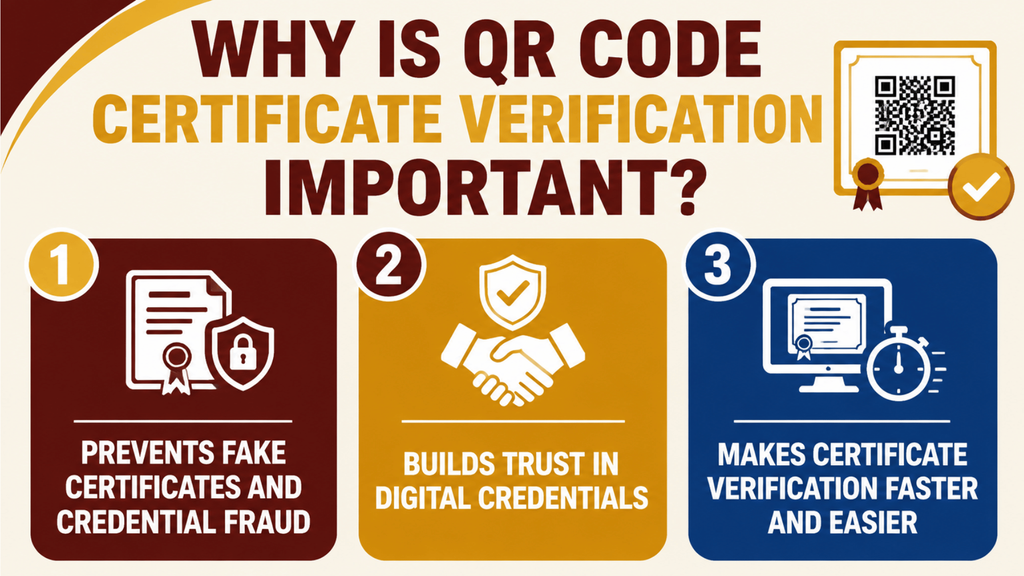
The importance of QR code certificate verification comes from its ability to improve certificate authenticity, strengthen certificate validation, and make credential verification more reliable. As organisations increasingly use digital certificates for education, training, and professional achievements, they need secure methods to confirm that credentials are genuine and have not been altered.
Unlike traditional certificate checks that depend on visual inspection or manual communication with the issuer, QR code verification connects certificates with official digital records. This allows organisations to confirm information quickly while reducing the risks associated with fraudulent credentials.
1. Prevents Fake Certificates and Credential Fraud
Fake certificate prevention is one of the main reasons organisations adopt QR code verification systems. A certificate may look genuine, but appearance alone cannot confirm whether it was officially issued or whether its information has been changed.
QR code verification helps with fraud detection by linking certificates to trusted records maintained by the issuing organisation. When a QR code is scanned, users can check important details such as the certificate holder, qualification, issue date, and certificate status.
This improves certificate security because fraudulent documents, copied certificates, and altered information are easier to identify. Organisations can compare certificate details with official records instead of relying only on the design, signatures, or logos shown on a document.
QR codes are useful for checking certificate authenticity, but they are only one part of protecting credentials against fraud. Training providers can also explore how to prevent certificate forgery and stop fake certificates online to understand other ways to protect their issued certificates.
2. Builds Trust in Digital Credentials
As more organisations move towards digital credentials, trust and verification have become essential. Learners, employees, and professionals need a reliable way to prove their achievements, while organisations need confidence that submitted credentials are genuine.
QR code certificate verification supports verifiable credentials by creating a connection between the certificate and the original issuing organisation. This allows:
- Learners to share achievements with confidence.
- Employers to verify qualifications more quickly.
- Educational institutions and training providers to maintain credibility.
By using trusted verification systems, organisations can strengthen confidence in digital achievements and ensure that genuine credentials receive proper recognition.
3. Makes Certificate Verification Faster and Easier
Traditional certificate verification often requires manual processes, such as sending emails, contacting certificate providers, or waiting for confirmation. These methods can take time, especially when organisations need to verify multiple certificates.
A QR code-based online verification system simplifies this process. Users can scan a QR code, access the verification page, and confirm certificate details within moments.
Compared with manual checking, digital certificate verification provides:
- Faster access to certificate records.
- Easier confirmation of certificate status.
- Reduced administrative workload.
- More efficient verification for employers and institutions.
How Does QR Code Certificate Verification Work: 4 Easy Steps
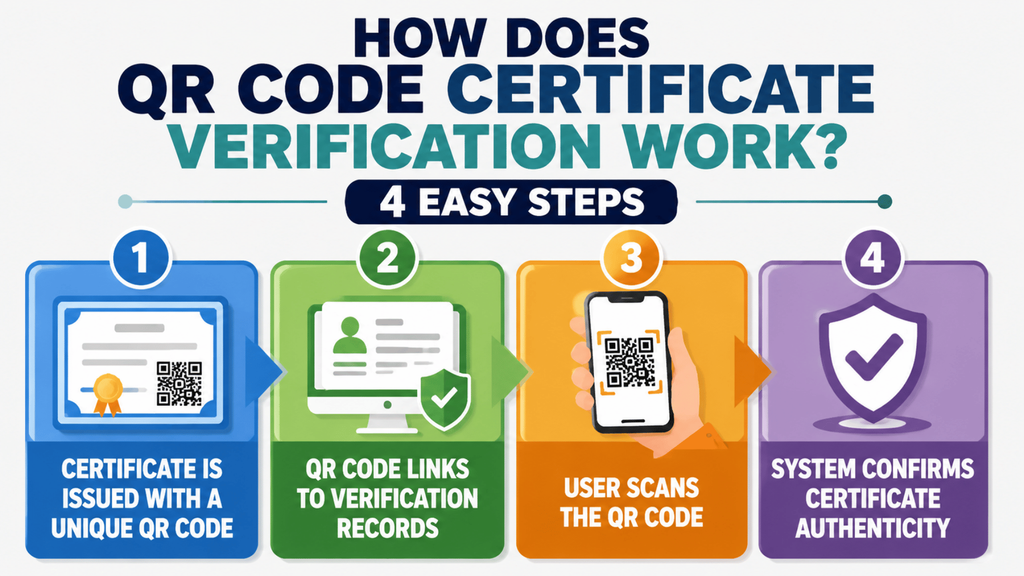
The QR code certificate verification process creates a connection between a certificate, the issuing organisation, and the official records used to confirm its authenticity. Instead of checking only the appearance of a document, QR code authentication allows users to verify whether certificate information matches the original data stored by the provider.
A typical QR code certificate verification system follows a simple process where a certificate is issued, linked to digital records, scanned by a user, and verified against the organisation’s database.
Step 1: Certificate Is Issued With a Unique QR Code
The process begins when an organisation creates and issues a certificate for a learner, employee, or recipient. During this stage, the certificate is connected with a unique identifier, such as a certificate ID.
The QR code certificate contains a link or reference that connects the document to its official verification record. The stored information may include:
- Certificate holder details
- Course or qualification completed
- Issue date
- Issuing organisation
- Certificate status
This unique connection makes it easier to verify whether a certificate was genuinely created by the organisation responsible for issuing it.
Step 2: QR Code Stores Verification Information
After the certificate is created, a verification QR code is added to provide quick access to certificate information. When scanned, the QR code directs users to a secure verification page connected to the organisation’s records.
A QR code authentication system may connect users with:
- Verification page
- Certificate records
- Certificate ID
- Digital identity information
- Certificate status details
The QR code itself does not store all certificate information. Instead, it acts as a secure link between the certificate and the digital verification system maintained by the issuing organisation.
Step 3: User Scans the QR Code
To begin verification, users scan the QR code using a smartphone camera, QR scanner, or dedicated verification tool.
For someone learning how to verify a certificate by QR code, the process is usually simple:
- Locate the QR code on the certificate.
- Scan the code using a compatible device.
- Open the verification page provided.
- Review the certificate details shown.
This allows employers, institutions, and other authorised users to check credentials without manually contacting the certificate provider.
Step 4: System Checks Certificate Records
After scanning, the verification system compares the certificate information with the official certificate records stored by the issuing organisation.
During this certificate validation process, the system may confirm:
- Certificate holder name
- Issuing organisation
- Course or qualification details
- Certificate ID
- Issue date
- Certificate status
If the information matches the official records, the certificate can be confirmed as genuine. If details do not match, the certificate may require further investigation.
How to Verify a Certificate by QR Code: Easy 5-Step Guide
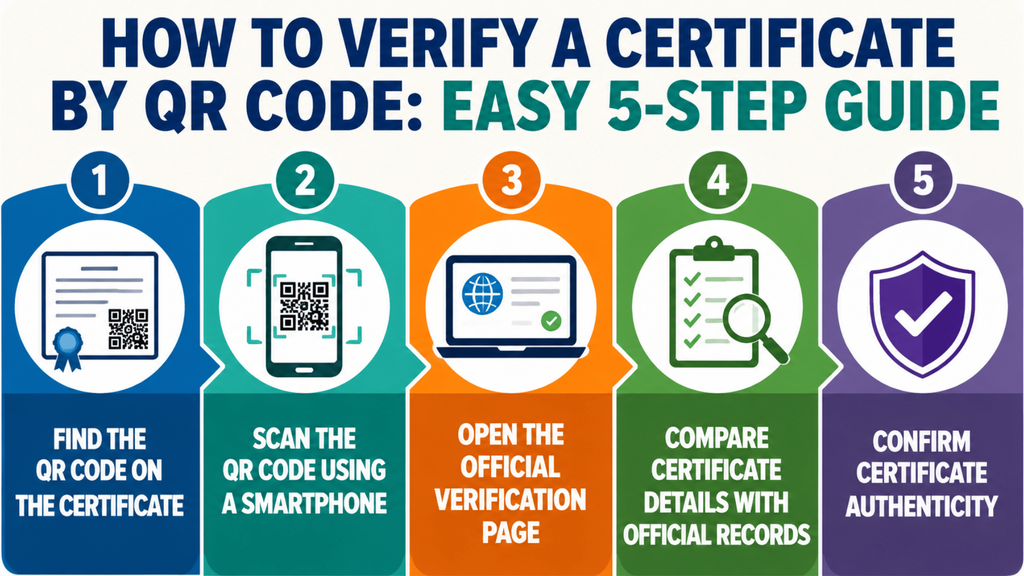
Knowing how to verify a certificate by QR code provides a quick and convenient way to confirm whether a credential is genuine. QR code document verification allows users to connect a certificate with official records maintained by the issuing organisation, helping employers, learners, and institutions confirm certificate details without relying only on a physical document.
The exact process may vary depending on the verification system used, but most QR-based certificate verification methods follow these simple steps.
1. Find the QR Code on the Certificate
Start by locating the QR code displayed on the certificate. It is usually placed on the certificate document alongside other information such as the certificate ID, issuer details, or verification instructions.
The QR code acts as a link between the certificate and the organisation’s online verification system. Before scanning, make sure the certificate has been issued by a trusted organisation to avoid accessing unreliable verification sources.
2. Scan the QR Code Using a Smartphone
Use a smartphone camera or QR code scanner to scan the code. Most modern smartphones can recognise QR codes automatically and provide a link to the connected verification page.
The scan should direct you to an official verification page where certificate information can be checked securely.
3. Open the Official Verification Page
After scanning the QR code, open the verification link provided. A trusted QR code document verification system should connect to a page managed by the certificate issuing organisation.
The verification page may display details such as:
- Certificate holder name
- Certificate ID
- Course or qualification completed
- Issue date
- Issuing organisation
- Certificate status
4. Compare Certificate Details With Official Records
Review the information shown on the verification page and compare it with the certificate you received.
Check whether important details match, including:
- Name of the certificate holder
- Qualification or training details
- Certificate number
- Issuing organisation
- Completion date
Matching information confirms that the certificate details are consistent with the official records.
5. Confirm Certificate Authenticity
The final step is confirming whether the certificate is genuine. If the information matches the records stored by the issuing organisation, the certificate can be considered successfully verified.
However, a QR code alone does not guarantee authenticity. A secure verification system behind the QR code is essential because it connects the certificate to trusted records and helps prevent fake or altered credentials.
How to Create a QR Code Certificate?
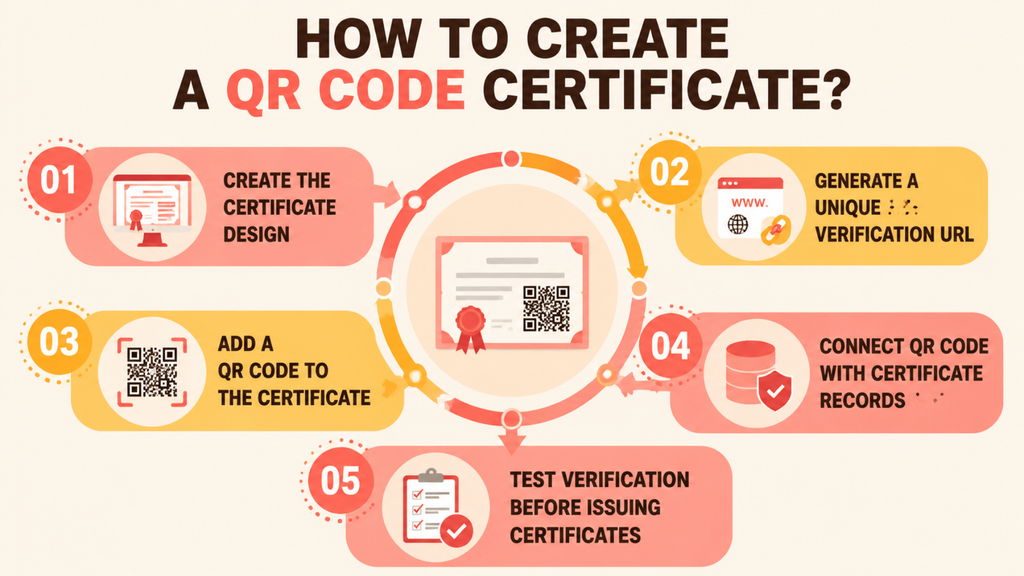
Creating a QR code certificate involves more than simply adding a QR image to a certificate design. The QR code needs to connect the certificate with a reliable verification system so that employers, learners, and other users can confirm whether the credential is genuine.
When organisations understand how to create a QR code certificate, they can make certificates easier to verify, improve trust, and reduce the risk of fake or altered credentials.
1. Create the Certificate Design
The first step is designing the certificate with all essential information required to identify the achievement and certificate holder. This usually includes the recipient’s name, course or qualification details, completion date, certificate ID, and issuing organisation information.
The design should also include space for the QR code and any verification instructions. A professional layout helps users recognise important details while making the verification process simple.
2. Generate a Unique Verification URL
A QR code certificate requires a unique verification link that connects the certificate to its official digital record. This verification URL acts as the connection between the physical or digital certificate and the information stored by the issuing organisation.
When users open the verification page, they should be able to view accurate certificate information, such as:
- Certificate holder details
- Qualification or course information
- Certificate ID
- Issue date
- Certificate status
- Issuing organisation
A unique verification URL ensures that every certificate has its own record that can be checked independently.
3. Add a QR Code to the Certificate
Once the verification URL is created, it can be converted into a QR code and added to the certificate. When scanned, the QR code directs users to the official verification page where certificate details can be reviewed.
A free QR code generator for certificate creation can help generate the QR code itself, but the QR code should always connect to a secure verification system. A QR code without a trusted database behind it does not provide reliable certificate authentication.
4. Connect the QR Code With Certificate Records
The effectiveness of QR code certificate verification depends on the records connected to it. The QR code should link to a secure system that stores and manages certificate information.
A reliable verification platform allows organisations to maintain accurate:
- Certificate records
- Certificate IDs
- Recipient information
- Qualification details
- Verification status
This allows employers and other authorised users to confirm whether a certificate matches the original information provided by the issuing organisation.
5. Test Verification Before Issuing Certificates
Before sending certificates to learners or professionals, organisations should test the complete verification process. This ensures the QR code works correctly and users can access the correct certificate information.
Testing should confirm that:
- The QR code scans successfully
- The verification page opens correctly
- Certificate details match the stored records
- Users can easily confirm certificate authenticity
Organisations that issue certificates regularly can use a certificate verification platform to automate certificate creation, QR code generation, record management, and online verification. For WordPress-based learning websites, Edutain Certificate Validator helps training providers add certificate verification functionality directly to their websites, allowing learners and employers to confirm certificates through a simple verification workflow.
What Is QR Code Authentication and How Does It Work?
QR code authentication is a method of confirming the identity, validity, or ownership of information by using a QR code connected to a trusted verification system. While QR codes are commonly used for payments, website access, and information sharing, they are also becoming an important part of secure document and certificate verification.
When users ask what is QR code authentication, it is important to understand that the QR code itself does not provide security on its own. Instead, it works as a connection between a physical or digital item and a secure system that verifies the information behind it.
A reliable QR code authentication system uses the QR code to direct users to an official verification page where information can be checked against trusted records.
How Does QR Code Authentication Work?
The process begins when a QR code is created and linked to specific information stored in a secure system. When someone scans the code, the system retrieves the connected information and checks whether it matches the original records.
The process usually involves:
- Identity confirmation: QR codes can help confirm that a document, certificate, or credential belongs to the correct person or organisation.
- Secure access: QR codes can provide controlled access to verification pages, accounts, or protected information.
- Document verification: QR codes can connect documents with official records, allowing users to confirm whether information is genuine.
- Authentication technology: The QR code acts as a simple access point, while the security comes from the verification platform, database, and authentication methods behind it.
For example, in certificate verification, scanning a QR code can open a verification page where users can check certificate details such as the holder’s name, certificate ID, issuing organisation, and status.
Why Is the Verification System Behind a QR Code Important?
Although QR codes are convenient, the code itself does not prove authenticity. Anyone can create a QR code that links to information, so trust depends on where the QR code leads and whether the connected system is controlled by a legitimate organisation.
A secure QR code authentication system should connect users to:
- A trusted verification page
- Accurate certificate records
- Secure databases
- Verified information from the issuing organisation
This is why QR code authentication is effective for certificate security, but only when combined with a reliable verification process. The QR code provides quick access, while the underlying system provides the confidence that the information is genuine.
Can QR Codes Be Used to Verify a Certificate?
Yes, QR codes can be used to verify a certificate when they are connected to a trusted verification system managed by the issuing organisation. A QR code provides a quick way for users to access certificate information and confirm whether a credential matches the official records.
When someone asks, “Can I scan a QR code to check its authenticity?”, the answer depends on what the QR code connects to. A genuine certificate QR code should direct users to an official verification page where certificate details can be checked against secure records.
However, a QR code alone does not prove that a certificate is authentic. Anyone can create a QR code, so the reliability of the verification depends on the system behind it. A secure certificate verification system should connect the QR code with trusted information maintained by the issuing organisation.
During verification, the system may check details such as:
- Certificate holder name
- Certificate ID
- Course or qualification details
- Issue date
- Certificate status
- Issuing organisation
If the information matches the original certificate records, the credential can be confirmed as genuine. If the details do not match, the certificate may require further investigation.
How to Identify a Fake QR Code Certificate: 3 Effective Ways
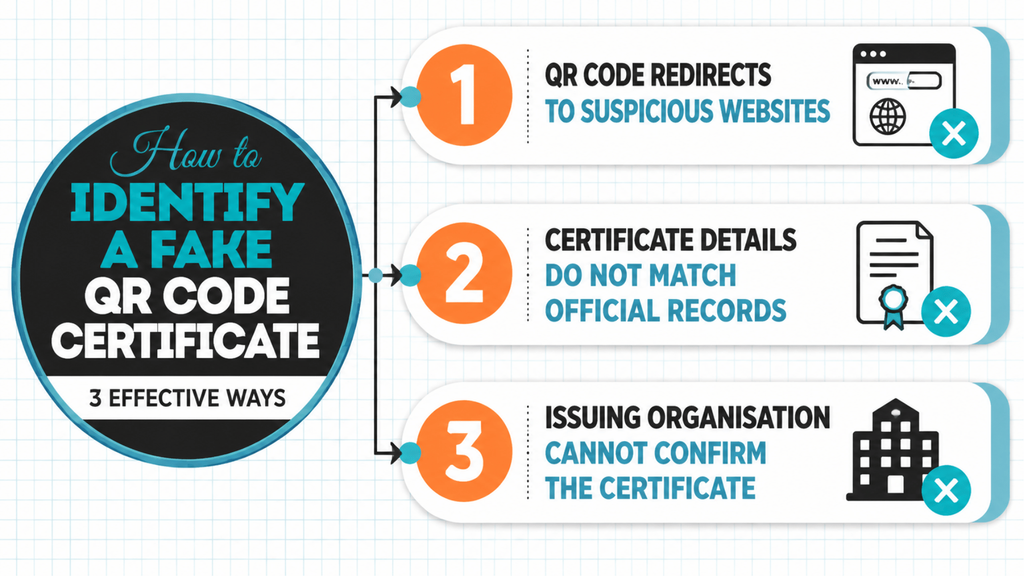
A fake QR code certificate can appear genuine at first glance, but checking the information behind the QR code can help identify fraudulent or altered credentials. Effective fake certificate detection requires more than simply scanning a QR code; users should confirm that the QR code connects to a trusted verification system and that the certificate details match official records.
When considering how can you tell a fake QR code?, the most important step is checking whether the QR code leads to a legitimate verification page managed by the certificate issuing organisation.
Here are some common warning signs to look for:
1. QR Code Redirects to Suspicious Websites
A genuine certificate QR code should normally direct users to an official verification page or a trusted platform connected with the issuing organisation.
Be cautious if the QR code:
- Opens an unrelated website
- Redirects to a suspicious domain
- Requests unnecessary personal information
- Does not provide any certificate verification details
A QR code that only displays random text or a general webpage may not provide reliable certificate authentication.
2. Certificate Details Do Not Match Official Records
During verification, compare the information displayed on the verification page with the certificate itself.
Check details such as:
- Certificate holder name
- Certificate ID
- Course or qualification details
- Issue date
- Issuing organisation
Any mismatch may indicate that the certificate has been changed, copied, or created without authorisation.
3. Issuing Organisation Cannot Confirm the Certificate
A reliable certificate should be connected to an identifiable issuing organisation that can confirm its validity.
If the organisation cannot find the certificate record, does not recognise the certificate number, or cannot confirm the achievement, the credential may require further investigation.
Missing Verification Information
A reliable certificate verification system should provide enough information for users to confirm whether a certificate is genuine. When important verification details are missing, it becomes difficult to confirm the certificate’s connection with the original issuing organisation.
Common warning signs include:
- No certificate ID or reference number
- No official verification page
- Missing issuing organisation details
- No certificate status information
- No matching digital certificate records
Certificates without proper verification information are harder to authenticate and may require additional checks before they can be trusted. A secure verification process should allow users to compare certificate details against official records maintained by the issuing organisation.
Incorrect or Invalid Certificate ID
A certificate ID is a unique reference number that connects a certificate to its official record within the organisation’s verification system. During certificate verification, this ID helps users confirm that the credential was genuinely issued and matches the stored information.
A certificate may require further investigation if the certificate ID:
- Does not exist in the organisation’s records
- Displays different certificate information
- Belongs to another certificate holder
- Shows an invalid or inactive status
An incorrect or invalid certificate ID can be a warning sign of a fake, altered, or unauthorised certificate. Reliable verification systems use certificate IDs alongside official records to help organisations confirm certificate authenticity and prevent credential fraud.
QR Code Certificate Verification vs Traditional Certificate Checking
Traditional certificate checking methods often rely on manual processes, while modern certificate verification tools use digital systems to provide faster and more reliable results. An online certificate validator allows users to confirm certificate details through secure verification pages instead of depending only on emails, phone calls, or visual document checks.
A certificate checker tool with QR code verification creates a direct connection between the certificate and official records, helping organisations improve accuracy and reduce fraud risks.
| Traditional Certificate Checking | QR Code Certificate Verification |
| Requires manual emails or direct contact with the issuer | Provides instant online verification |
| Time-consuming verification process | Faster certificate checking |
| Higher risk of accepting fake or altered certificates | Improved certificate security and authenticity checks |
| Difficult to manage large numbers of certificates | Suitable for organisations handling multiple credentials |
| Relies on manual record checking | Connects directly with digital certificate records |
QR code verification does not completely replace the need for trusted certificate records, but it makes the verification process more efficient by allowing users to quickly access and confirm official information. For organisations issuing certificates at scale, a digital verification system provides a more practical way to manage and authenticate credentials.
Who Uses QR Code Certificate Verification Systems: 4 Key Users Explained
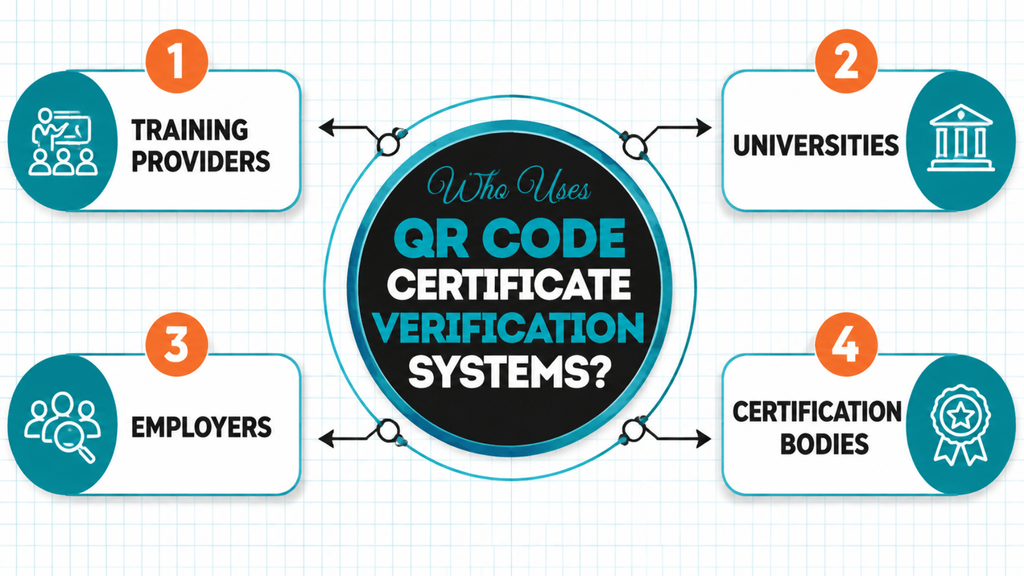
A digital certificate verification system can support any organisation that issues, manages, or needs to confirm credentials. From education providers to employers, QR code verification helps improve trust, reduce manual checking, and create a reliable way to confirm whether certificates are genuine.
A certificate verification software solution or certificate validation platform allows organisations to store certificate records, manage digital credentials, and provide faster verification for authorised users.
1. Training Providers
Training providers often need a simple way to issue certificates, maintain learner records, and allow employers to verify completed training. A WordPress certificate verification solution such as Edutain Certificate Validator allows education providers to add certificate validation features to their websites without creating a verification system from scratch.
By connecting certificates with digital records, training providers can give learners a simple way to prove their achievements while helping employers confirm that qualifications are genuine.
2. Universities
Universities use certificate verification systems to protect academic credentials and improve trust in educational records. Digital verification helps institutions confirm degrees, course completions, and other academic achievements.
A secure certificate validation platform allows universities to provide faster verification services while maintaining accurate records of student qualifications.
3. Employers
Employers use QR code certificate verification to check candidate qualifications, professional certifications, and training achievements during recruitment or compliance processes.
A reliable certificate verification software solution helps employers verify credentials efficiently, reduce the risk of fraudulent claims, and make more informed hiring decisions.
4. Certification Bodies
Certification bodies use digital verification systems to maintain trusted records and support the authenticity of professional credentials. These organisations can manage issued certificates, track verification activity, and provide reliable confirmation of achievements.
The Future of Certificate Verification: Digital Credentials and Verifiable Credentials
The future of certificate verification is moving towards more secure, flexible, and easily accessible digital systems. As education providers, employers, and professional organisations increasingly rely on online certificates, traditional paper-based credentials are being replaced by digital credentials that can be shared and verified more efficiently.
Unlike traditional certificates that depend on physical documents, digital credentials allow achievements to be stored, accessed, and verified online. This creates a more reliable approach to digital credential verification, helping organisations confirm whether a qualification or achievement is genuine without relying on manual checks.
The Growth of Digital Certificates
The use of digital certificates has increased as more organisations deliver online learning, professional training, and remote education. Digital certificates provide a convenient way for learners and professionals to demonstrate completed courses, qualifications, and skills.
However, digital certificates also require reliable verification methods. A simple PDF certificate can be copied or edited, which is why modern systems use technologies such as QR code verification, secure databases, and digital records to protect certificate authenticity.
By connecting certificates with trusted verification systems, organisations can ensure that digital achievements remain reliable and easy to confirm.
Portable Credentials and Easier Verification
One major advantage of digital credentials is portability. Instead of keeping certificates stored in one location, individuals can share verified achievements with employers, universities, or professional organisations whenever required.
Portable credentials allow users to:
- Share qualifications digitally
- Provide quick proof of achievements
- Allow employers to verify skills more efficiently
- Maintain a trusted record of learning history
This approach supports a future where credentials can move easily between platforms while maintaining their authenticity.
The Role of Verifiable Credentials
Verifiable credentials are designed to make digital achievements easier to trust by allowing information to be verified through secure systems. They create a connection between the credential holder, the organisation that issued the credential, and the party checking its authenticity.
The World Wide Web Consortium (W3C) has developed standards for verifiable credentials that support secure digital identity and credential sharing.
For certificate verification, this means organisations can move beyond simple document sharing and adopt systems where credentials can be checked against trusted information sources.
The Future of Online Verification Systems
Future digital credential verification systems are expected to become more automated, secure, and widely connected. Organisations will increasingly use technologies such as:
- QR code certificate verification
- Secure digital records
- Automated verification platforms
- Credential management systems
- Identity verification technologies
These systems can reduce administrative work while improving trust between certificate holders, employers, and issuing organisations.
Standards organisations such as the International Organization for Standardization (ISO) also contribute to creating consistent approaches for security, information management, and trusted digital systems.
The Future of Credential Management
As more organisations issue digital certificates, effective credential management will become essential. Universities, training providers, and certification bodies will need systems that can securely create, store, update, and verify credentials.
Modern certificate verification platforms will help organisations:
- Maintain accurate certificate records
- Prevent fraudulent credentials
- Provide faster verification
- Improve trust in digital achievements
The future of certificate verification is not only about replacing paper certificates with digital versions. It is about creating trusted systems where achievements can be securely shared, easily verified, and recognised across different organisations and platforms.
Frequently Asked Questions About QR Code Certificate Verification
Can this QR code be used to verify a certificate?
Yes, a QR code can be used to verify a certificate when it is connected to a trusted verification system. When scanned, the QR code can direct users to an official verification page where certificate details are checked against records maintained by the issuing organisation.
However, the QR code itself does not prove authenticity. The reliability comes from the secure database and verification system behind the QR code.
Can I scan a QR code to check its authenticity?
Yes, you can scan a QR code to check certificate authenticity if the QR code links to a legitimate verification page. After scanning, users should review details such as the certificate holder, certificate ID, qualification information, issue date, and issuing organisation.
A genuine verification system should allow users to compare the certificate information with official records.
How to verify a certificate by QR code?
To verify a certificate by QR code:
- Locate the QR code on the certificate.
- Scan it using a smartphone camera or QR scanner.
- Open the official verification page.
- Compare the displayed information with the certificate.
- Confirm whether the certificate status matches the official records.
A successful verification confirms that the certificate information is connected to a valid record.
How to make a certificate with QR code?
To make a certificate with a QR code, organisations need to create a certificate design, generate a unique verification link, and connect the QR code to a secure verification system.
The process usually involves:
- Creating the certificate with relevant details.
- Assigning a unique certificate ID.
- Generating a verification URL.
- Adding the QR code to the certificate.
- Testing the verification process before issuing.
A QR code certificate generator or certificate verification platform can help automate this process.
How can you tell a fake QR code?
A fake QR code may show warning signs such as redirecting users to suspicious websites, displaying incorrect certificate information, or failing to connect with official records.
To identify a suspicious QR code certificate, check:
- Whether it opens an official verification page.
- Whether certificate details match the records.
- Whether the issuing organisation can confirm the credential.
- Whether the certificate ID is valid.
How can I test if a QR code is valid?
You can test a QR code by scanning it and checking whether it directs you to the correct verification page. A valid certificate QR code should connect to a trusted system and display accurate certificate information.
A valid QR code verification system should provide details such as the certificate holder, certificate ID, issuing organisation, and certificate status.
What does a valid QR code look like?
A valid QR code looks like a standard square pattern made up of black and white modules. However, appearance alone cannot confirm whether a QR code is trustworthy.
For certificate verification, the important factor is not how the QR code looks but where it leads and whether it connects to official certificate records.
What happens when you scan a fake QR code?
When scanning a fake QR code, it may redirect users to an unrelated website, display incorrect information, collect unnecessary data, or fail to provide any verification details.
For certificate verification, always check that the QR code connects to an official verification page managed by the issuing organisation.
What reads a QR code?
QR codes can be read using smartphone cameras, QR scanner applications, or dedicated verification tools. Most modern smartphones can automatically detect QR codes and open the linked information.
For certificate verification, the QR scanner only provides access to the verification page; the authentication happens through the connected verification system.
When a QR code is scanned, where does it go?
When a QR code is scanned, it usually directs the user to a website, verification page, or digital record connected to the information stored in the code.
For certificate verification, the QR code should lead to an official verification page where users can check certificate details against trusted records maintained by the issuing organisation.
Conclusion
As digital certificates become more widely used, organisations need reliable ways to protect certificate authenticity and prevent fraudulent credentials. A secure QR code verification tool helps connect certificates with trusted records, allowing employers, learners, and institutions to confirm achievements quickly and confidently.
When choosing certificate verification software, organisations should look for solutions that provide secure verification, accurate certificate records, easy management, QR code support, and smooth integration with existing systems. The right digital credential management system can simplify certificate administration while improving trust in issued credentials.
For training providers and organisations using WordPress, Edutain Certificate Validator provides a simple solution to create, manage, and verify certificates through an organised verification workflow. By connecting certificates with digital records and QR-based verification, organisations can reduce fraud risks and provide a more trusted certificate experience for learners and employers.

Tamim is a digital marketing professional who enjoys learning about online education and new digital technologies. He writes about digital tools, certifications, marketing, and simple ways businesses and educators can improve their online presence.