Certificates are widely used to prove education, professional training, and workplace achievements. However, as digital certificates become more common, organisations and individuals need reliable ways to confirm whether credentials are genuine. Understanding how to verify a certificate online helps employers, learners, and institutions check certificate authenticity and reduce the risks associated with fraudulent documents.
Traditional certificate checking often depends on manual processes, such as contacting the issuing organisation or reviewing physical documents. Modern certificate verification systems make this process faster by connecting certificates with official records, allowing users to confirm whether a credential was genuinely issued.
The increasing use of online learning, digital credentials, and professional certifications has also increased concerns about fake certificates and fake diplomas. Fraudulent documents can damage trust between employers, educational institutions, training providers, and certificate holders.
An online verification process provides a more reliable way to confirm genuine achievements by checking important details such as certificate numbers, certificate IDs, issuing organisations, and verification records.
What Is Certificate Verification?
Certificate verification is the process of confirming whether a certificate is genuine, valid, and officially issued by a recognised organisation. It allows individuals, employers, and institutions to verify certificates by checking certificate details against trusted records maintained by the certificate issuer.
The purpose of certificate validation is to ensure that the information shown on a certificate matches the original record created by the issuing organisation. Instead of relying only on the appearance of a document, verification systems compare important details stored in official databases or digital records.
A certificate verification process usually checks information such as:
- Certificate ID – A unique identifier assigned to a specific certificate.
- Certificate number – A reference number used to locate and confirm the certificate record.
- Verification record – The official digital record containing certificate details stored by the issuing organisation.
- Certificate status – Information showing whether a certificate is valid, expired, revoked, or unavailable.
The certificate issuer or issuing organisation plays an important role in maintaining accurate records and ensuring that only genuine certificates can be verified. For example, employers and organisations can use verification services to confirm UK higher education qualifications and reduce the risk of fraudulent claims.
How to Verify a Certificate Online: 5 Simple Steps
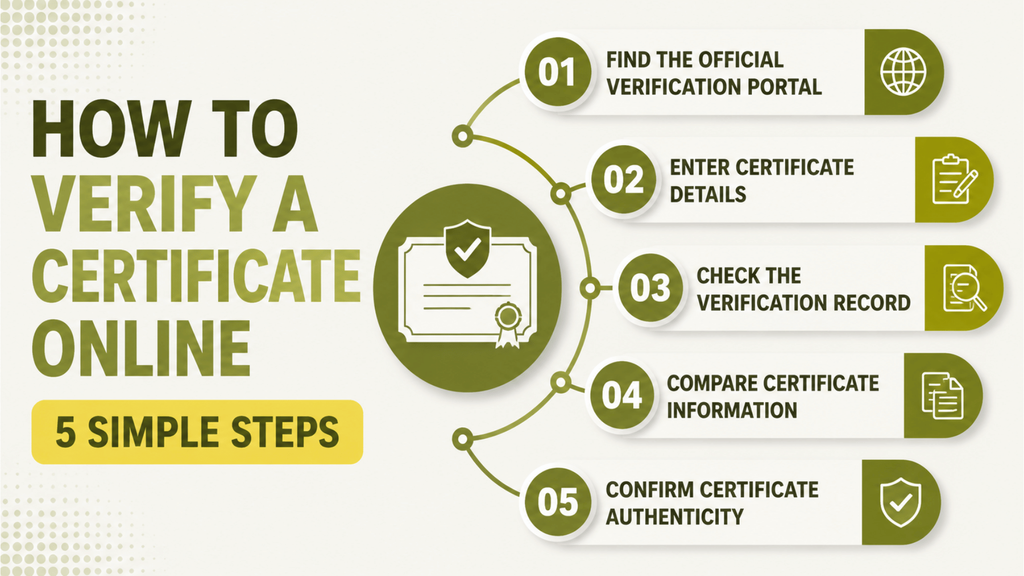
Knowing how to verify a certificate online allows individuals, employers, and organisations to confirm whether a credential is genuine without relying only on a physical document. A reliable online verification process connects the certificate with official records maintained by the issuing organisation, making it easier to confirm certificate authenticity and check whether the information is valid.
The exact steps may vary depending on the verification system used, but most certificate verification processes follow these five simple steps.
Step 1: Find the Official Verification Portal
The first step is to locate the official verification portal provided by the certificate issuer or issuing organisation. Secure identity verification practices help ensure that information is checked through trusted processes. Always use the official website of the university, training provider, certification body, or organisation that issued the certificate.
A trusted verification page usually contains a dedicated verification URL where users can enter certificate details and access the related verification record.
Avoid using unknown third-party websites that claim to verify certificates, as they may not provide accurate or secure information.
Step 2: Enter Certificate Details
Once you access the verification page, enter the required certificate information into the system. The details required may vary depending on the organisation, but most verification systems ask for key information such as:
- Certificate ID
- Certificate number
- Certificate holder name
- Course or qualification details
These details help the system locate the correct certificate record and match it with the information stored by the issuing organisation.
Step 3: Check the Verification Record
After submitting the certificate details, the system checks the information against the official verification record stored by the certificate issuer.
The verification result may show the current certificate status, such as:
- Valid certificate
- Invalid certificate
- Certificate record not found
- Expired or inactive certificate
This step helps users confirm whether the certificate exists in the organisation’s official records and whether the credential is recognised.
Step 4: Compare Certificate Information
After receiving the verification result, compare the displayed information with the original certificate. This step helps confirm certificate authenticity and ensures that the details have not been changed or misrepresented.
Important details to check include:
- Certificate holder name
- Course or qualification completed
- Issuing organisation
- Certificate issue date
- Certificate number
If the information matches the official records, the certificate is more likely to be genuine. Any mismatch may require further investigation.
Step 5: Confirm Certificate Authenticity
The final step is confirming whether the certificate is authentic based on the verification results. A successful verification means that the certificate details match the records maintained by the issuing organisation.
A secure verification system provides confidence that a certificate has been genuinely issued and helps prevent certificate fraud. For organisations managing large numbers of credentials, digital verification tools can make the process faster, more accurate, and easier to manage.
How to Check If a Certificate Is Real or Fake: 5 Simple Steps
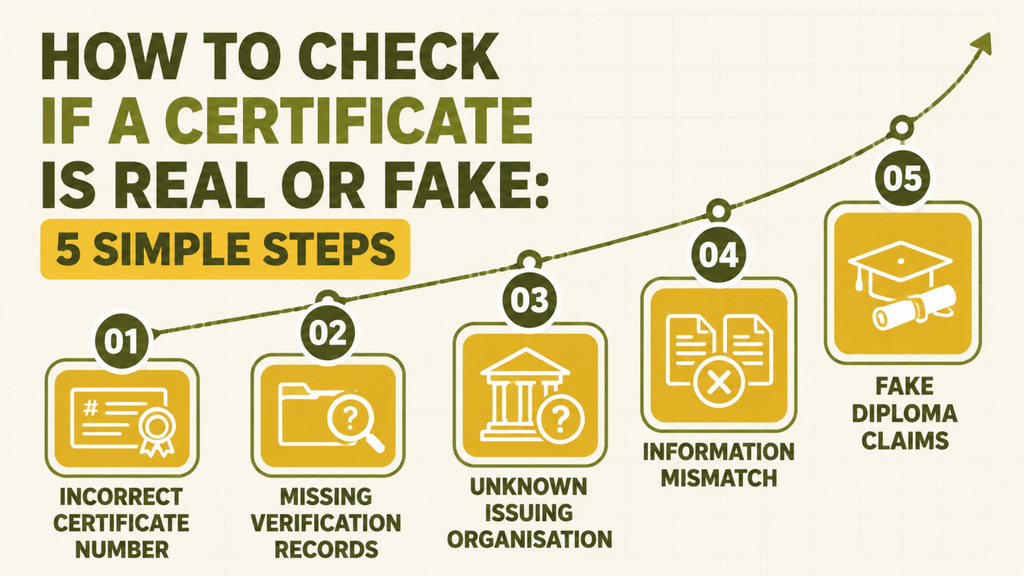
Knowing how to check if a certificate is real or fake is important for employers, educational institutions, and organisations that rely on qualifications when making decisions. While a certificate may look professional, its appearance alone cannot confirm whether it is genuine. Effective fake certificate detection requires checking the certificate against trusted records and confirming details with the issuing organisation.
Learning how to identify a fake certificate involves looking for warning signs that may indicate inaccurate, altered, or fraudulent information. The following checks can help determine whether a certificate is authentic.
1. Incorrect Certificate Number
A genuine certificate usually includes a unique certificate number or reference ID that connects it to an official record. During verification, this number should match the information stored by the issuing organisation.
A certificate may be suspicious if:
- The certificate number does not exist.
- The number belongs to another person.
- The certificate details do not match the record.
- The verification system shows an invalid status.
Checking the certificate number is one of the simplest ways to identify potentially fake credentials.
2. Missing Verification Records
Reliable certificates should be supported by official verification records maintained by the certificate issuer. These records allow organisations to confirm details such as the certificate holder, qualification, issue date, and completion status.
A certificate may require further investigation if:
- No verification record can be found.
- The certificate cannot be confirmed online.
- The issuing organisation cannot locate the credential.
- Certificate details are unavailable.
A missing record does not always prove fraud, but it is an important warning sign that requires further checking.
3. Unknown Issuing Organisation
Certification and conformity assessment processes help organisations establish trust in products, services, and professional activities.
When checking a certificate, verify:
- Whether the issuing organisation exists.
- Whether it officially provides the stated qualification or training.
- Whether it has a recognised verification process.
Certificates from unknown organisations or organisations that cannot confirm their credentials may not be reliable.
4. Information Mismatch
Another common sign of a fake certificate is when the information on the document does not match the official records.
Check important details, including:
- Certificate holder name
- Course or qualification title
- Completion date
- Certificate number
- Issuing organisation
Differences between the certificate and verification records may indicate that the document has been edited, copied, or incorrectly issued.
5. Fake Diploma Claims
Fake diplomas are often created to falsely represent academic achievements or professional qualifications. These documents may copy the branding of legitimate institutions or use misleading names to appear genuine.
To identify a possible fake diploma, check whether:
- The university or institution is legitimate.
- The qualification is offered by the organisation.
- The certificate can be verified through official channels.
- The academic record matches the claimed achievement.
Using a trusted certificate verification process helps employers and institutions reduce the risk of accepting fraudulent qualifications and protects the value of genuine credentials.
How Does Digital Certificate Verification Work?
Digital certificate verification is the process of confirming the authenticity and validity of a certificate using online systems, secure records, and digital technologies. Unlike traditional paper-based verification, digital verification allows organisations to check credentials faster by connecting certificates with trusted digital records.
As more organisations use digital credentials for education, professional training, and workplace achievements, secure verification systems have become essential for protecting certificate authenticity and reducing certificate fraud.
Digital Certificate Records
Digital certificate verification relies on digital records stored by the certificate issuer or issuing organisation. When a certificate is created, important information is recorded in a secure system, including:
- Certificate holder details
- Certificate ID or certificate number
- Qualification or course information
- Issue date
- Certificate status
- Issuing organisation
These records provide a trusted reference point when someone needs to verify whether a certificate is genuine.
Verification Systems
A digital verification system connects certificates with official records and allows authorised users to confirm certificate details online. When a certificate is checked, the system compares the submitted information with the stored verification record.
A secure verification system can confirm whether a certificate is:
- Valid and officially issued
- Invalid or unavailable
- Linked to the correct certificate holder
- Recognised by the issuing organisation
This improves the digital certificate verification process by reducing manual checks and providing faster confirmation.
QR Code Verification
QR code verification is one of the most common methods used to make digital certificate checking easier. A QR code placed on a certificate can link users directly to an official verification page where certificate information can be reviewed.
When scanned, the QR code may provide access to:
- Verification URL
- Certificate records
- Certificate status
- Issuing organisation details
However, the QR code itself does not prove authenticity. The security depends on the verification system and the accuracy of the digital records connected to it.
Digital Signatures and Secure Online Records
Digital signatures provide an additional layer of trust by helping confirm that digital information has not been altered after it was issued. They use cryptographic methods to protect the integrity of digital documents and credentials.
Secure online records help organisations maintain accurate certificate information while preventing unauthorised changes. Universities, training providers, employers, and certification bodies can use these systems to manage credentials more effectively.
Wondering how this works in practice? Read how Sarah made hundreds of old certificates verifiable using Edutain Certificate Validator with just one CSV file and no LMS.
How to Validate a Certificate Online for Free: 3 Reliable Methods
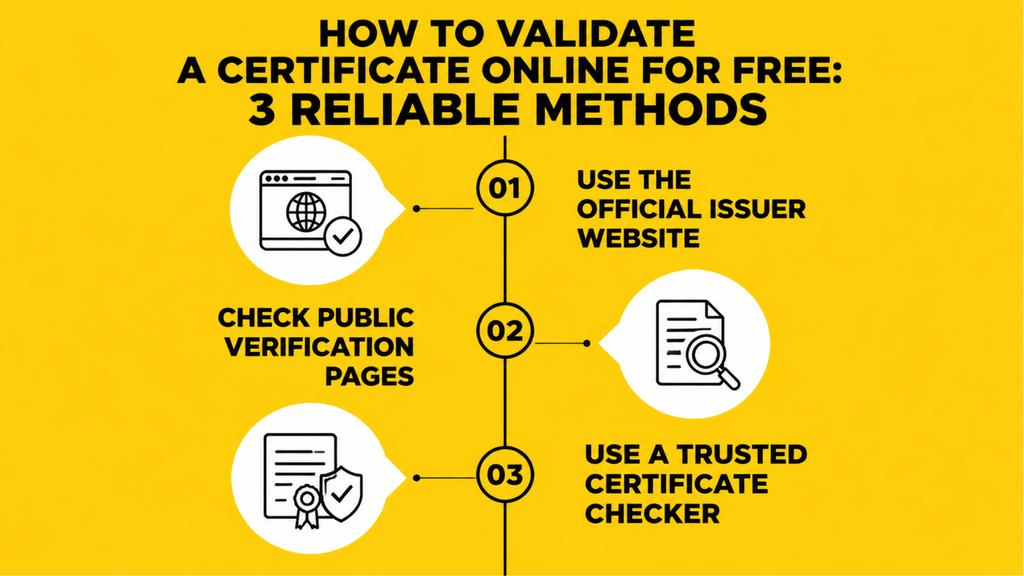
Knowing how to validate a certificate online allows individuals and organisations to confirm whether a credential is genuine without relying only on a physical document. Free verification options make it easier for learners, employers, and institutions to check certificate details and confirm whether information matches official records.
While some organisations use paid verification platforms for large-scale credential management, many certificates can be checked through free methods provided by the certificate issuer or issuing organisation.
1. Use the Official Issuer Website
The most reliable way to check certificate online for free is to use the official website of the organisation that issued the certificate. Universities, training providers, certification bodies, and professional organisations may provide online verification pages where users can enter certificate details.
When using an official verification page, users may need to provide information such as:
- Certificate ID
- Certificate number
- Certificate holder name
- Qualification or course details
The system then checks these details against the organisation’s records to confirm whether the certificate is valid.
2. Check Public Verification Pages
Many organisations provide public verification pages that allow anyone to check certificate information without contacting the issuer directly. These pages work as a simple website certificate checker, allowing users to access certificate records through a verification URL.
A public verification page may display details such as:
- Certificate holder information
- Issuing organisation
- Qualification details
- Issue date
- Certificate status
This makes certificate checking faster while reducing the need for manual email requests or phone confirmations.
3. Use a Trusted Certificate Checker
A certificate checker can help users verify credentials by connecting certificate details with official records. However, users should ensure that the checker is provided by a trusted organisation or connected to the original certificate issuer.
A reliable certificate checker should:
- Access accurate certificate records
- Confirm certificate authenticity
- Provide clear verification results
- Protect certificate information
Free online verification tools are useful for checking individual certificates, while organisations managing large numbers of credentials may benefit from dedicated certificate verification platforms that provide automated management and verification features.
How Do Employers Verify Certificates?
Employers need reliable ways to confirm that a candidate’s qualifications, training, and professional achievements are genuine before making hiring or compliance decisions. Using certificate verification tools and an online certificate checker, employers can quickly confirm whether a credential was issued by a legitimate organisation and matches official records.
Certificate verification helps employers reduce the risk of accepting fake qualifications while ensuring that genuine candidates receive proper recognition for their skills and achievements.
Verify Professional Certifications
Employers often check professional certifications to confirm that candidates have completed recognised training or industry-specific programmes. This is especially important for roles where qualifications are required for compliance, technical skills, or professional standards.
Using verification systems, employers can check details such as:
- Certificate holder name
- Certification title
- Certificate ID or number
- Issuing organisation
- Validity status
This allows employers to confirm that a professional certification is authentic and has not been altered or misrepresented.
Verify Training Certificates
Many employers review training certificates during recruitment, onboarding, and employee development processes. These may include workplace training, online courses, compliance programmes, or skills-based learning certificates.
Through an online certificate checker, employers can verify whether:
- The employee completed the stated training
- The certificate was issued by the claimed provider
- The certificate details match official records
This creates a more reliable way to assess employee skills and training history.
Verify Educational Qualifications
Employers may also need to confirm academic achievements such as degrees, diplomas, and other educational certificates. Universities and educational institutions often maintain official records that can be used to verify qualifications.
Employers can verify educational certificates through:
- University verification portals
- Certificate databases
- Direct confirmation from the issuing institution
- Digital verification systems
A certificate may look genuine but still contain false or altered information. To recognise suspicious credentials, read our guide on how to check if a certificate is original or fake online, including common warning signs and methods for confirming authenticity.
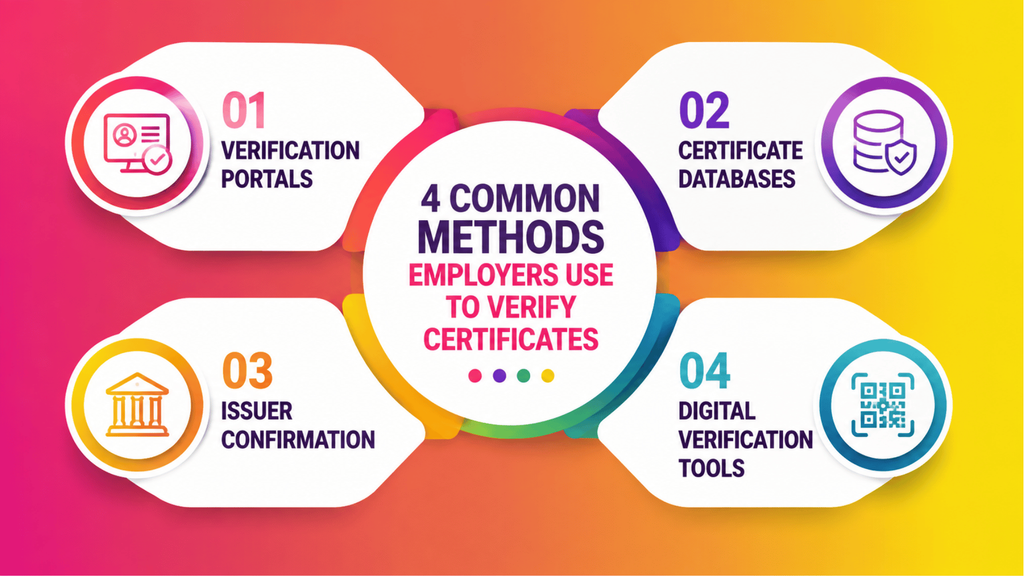
4 Common Methods Employers Use to Verify Certificates
1. Verification Portals
Many organisations provide online verification portals where employers can enter certificate details and instantly check credential information.
These portals allow users to confirm certificate status without requiring lengthy manual communication.
2. Certificate Databases
Secure certificate databases store official records of issued credentials. Employers can compare certificate information against these records to confirm authenticity.
3. Issuer Confirmation
For some qualifications, employers may directly contact the certificate issuer, university, or training provider to confirm whether a credential was genuinely issued.
4. Digital Verification Tools
Modern certificate verification tools use technologies such as QR code verification, digital records, and automated checking systems to make verification faster and more efficient.
Best Digital Certificate Verification Tools for Organisations
Choosing the right digital certificate verification tools is important for organisations that issue, manage, and verify credentials at scale. A reliable certificate verification platform helps organisations protect certificate authenticity, reduce administrative work, and provide a faster way for employers, learners, and other users to confirm credentials.
The best verification solutions do more than store certificate information. They connect certificates with secure records, automate verification processes, and provide a trusted way to check whether a credential was genuinely issued.
When evaluating top digital certificate verification tools, organisations should look for the following features:
Secure Certificate Database
A secure certificate database is the foundation of any reliable verification system. It allows organisations to store and manage important certificate information, including certificate holder details, certificate numbers, issue dates, qualifications, and verification records.
Secure storage ensures that users are checking credentials against official records rather than relying only on a document copy that could have been edited or duplicated.
Certificate ID Search
A unique certificate ID allows each credential to be identified and verified separately. A good verification platform should allow users to search certificates using an ID or reference number and quickly access the related verification record.
This makes it easier for employers, institutions, and certificate holders to confirm whether a credential exists and whether the details match the original record.
QR Code Verification
Modern certificate verification platforms often include QR code verification to make checking credentials faster and easier. A QR code placed on a certificate can direct users to an official verification page where certificate details can be reviewed.
This removes the need for manual emails or phone confirmations and allows users to verify certificates using a simple scan.
Digital Records Management
Effective digital records management helps organisations create, organise, and maintain certificates throughout their lifecycle.
A complete verification system should help organisations:
- Store certificate records securely
- Manage issued credentials
- Update certificate status
- Maintain accurate verification information
This is especially valuable for universities, training providers, and certification bodies that manage large numbers of certificates.
Automated Verification
Automation makes certificate verification faster and reduces manual workload. Instead of manually checking documents or responding to repeated verification requests, organisations can provide users with instant access to trusted verification results.
Automated verification helps employers and institutions confirm credentials quickly while improving the overall certificate verification experience.
Edutain Certificate Validator: A WordPress Certificate Verification Solution
For organisations using WordPress, Edutain Certificate Validator provides a practical way to add certificate verification functionality directly to their websites.
The plugin helps training providers and online learning platforms create verifiable certificates, manage certificate records, and allow users to confirm certificate authenticity through a simple verification workflow.
Organisations can explore setup instructions and configuration options through the official documentation.
Frequently Asked Questions
How to verify if a certificate is valid?
To verify if a certificate is valid, check it through the official verification portal provided by the issuing organisation. Enter details such as the certificate ID, certificate number, or certificate holder information to compare the details with the organisation’s official records.
A valid certificate should match the stored verification record and display accurate information about the certificate holder, qualification, and issuing organisation.
How to check if a certificate is real or fake?
To check whether a certificate is real or fake, verify the certificate details through a trusted verification system. Look for warning signs such as incorrect certificate numbers, missing records, unknown issuing organisations, or information that does not match official records.
Using a reliable certificate checker can help confirm whether the credential is genuine.
How do I verify a certificate?
You can verify a certificate by visiting the official verification page of the certificate issuer and entering the required details. Depending on the system, you may need a certificate ID, certificate number, or verification URL.
The system then checks the information against official records and provides the certificate status.
Is it possible to check a certificate online?
Yes, many certificates can be checked online through official verification portals, digital certificate systems, or certificate checking platforms. Online verification allows users to confirm certificate authenticity without contacting the issuing organisation manually.
How can I validate a certificate?
You can validate a certificate by checking whether its details match the records maintained by the certificate issuer. A reliable validation process confirms information such as the certificate holder, qualification, issue date, and certificate status.
How can I check certificate authenticity?
To check certificate authenticity, use the official verification system provided by the issuing organisation. Compare the certificate information with the verification record and confirm details such as the certificate ID, issuing organisation, and qualification details.
What is the best online certificate checker?
The best online certificate checker should provide secure records, accurate verification results, certificate ID search, and easy access to certificate information.
For organisations, a good certificate verification platform should also support features such as QR code verification, digital records management, and automated verification.
How are certificates verified?
Certificates are verified by comparing certificate details against official records stored by the issuing organisation. Modern verification systems may use certificate databases, digital credentials, QR code verification, and secure online records to confirm authenticity.
How do I authenticate a certificate?
To authenticate a certificate, check it through a trusted verification portal or contact the certificate issuer directly. The authentication process confirms that the certificate was genuinely issued and that the information has not been altered.
What does it mean when a certificate is not valid?
A certificate may be considered invalid if the certificate details cannot be found in official records, the information does not match the issuer’s database, or the credential has been cancelled, expired, or incorrectly issued.
An invalid certificate should be investigated further with the issuing organisation before being accepted.
Conclusion
As digital certificates become more widely used across education, professional training, and employment, ensuring certificate authenticity has become more important than ever. A reliable verification process helps individuals and organisations confirm genuine achievements while reducing the risks associated with fake certificates, altered documents, and certificate fraud.
Traditional certificate checking methods can be slow and difficult to manage, especially when organisations need to verify large numbers of credentials. Digital verification systems provide a faster and more reliable approach by connecting certificates with secure records, allowing users to check certificate details, status, and issuer information online.
For organisations such as training providers, universities, certification bodies, and employers, investing in a trusted certificate verification platform can improve credential management, strengthen trust, and simplify the verification process.
Organisations using WordPress can use Edutain Certificate Validator to create, manage, and verify certificates through a simple online verification workflow.

Avik Sharafat Al Rahman is a blogger who writes about technology. He shares information about new technologies, digital trends, and useful tech tips. He enjoys helping people learn more about the world of technology through his blogs.